
Connected wellbeing5 minute read
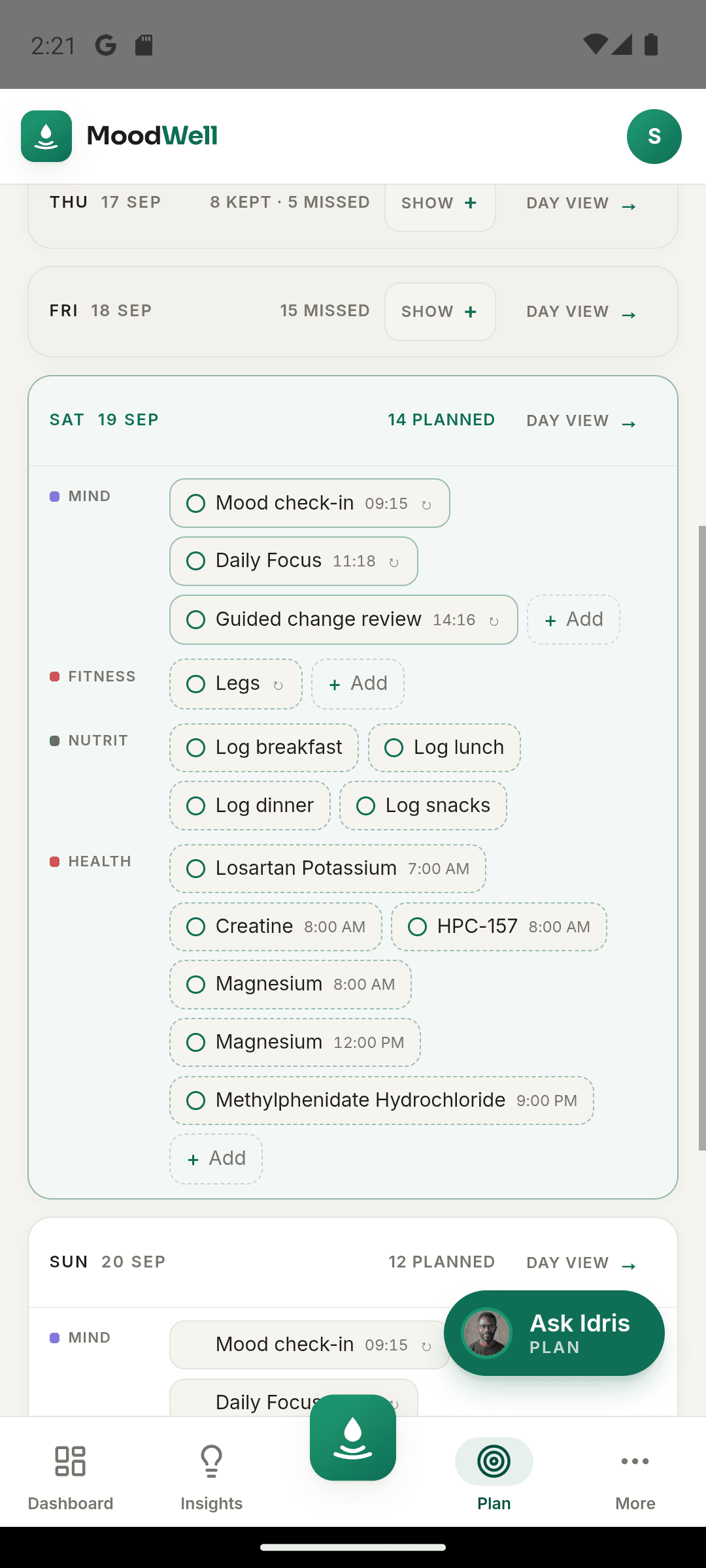
Weekly wellbeing planner
How to build a weekly wellbeing plan
Bring workouts, meals, health schedules, and personal commitments into one realistic view of the week.
Moodwell guides
Learn how to log a workout, review a food entry, import health records, or start a journal. Each guide explains the steps, gives you an example, and shows how to use the relevant Moodwell feature.
85 practical guides across the four layers and your connected day.
A good first guide from each part of Moodwell.
Weekly wellbeing planner
Bring workouts, meals, health schedules, and personal commitments into one realistic view of the week.
Workout tracker
Set up the session, record sets accurately, and use the completed summary to make the next workout easier to plan.
Choose the fastest capture method for the food in front of you, then review the result before it reaches your diary.
GLP-1 tracker
Keep a clear personal history of recorded doses, injection sites, symptoms, weight, schedules, and supply without turning the log into medical advice.
Mood tracker
Build a short check-in you can repeat, know what to record, and use the history without turning it into another chore.
Search by what you want to do, or narrow the list by topic and by the part of Moodwell you are using.
Showing all 85 guides
Build a weekly plan that fits workouts, meals, health schedules, and the rest of your commitments.
Weekly wellbeing planner
Bring workouts, meals, health schedules, and personal commitments into one realistic view of the week.
Build routines, organize training weeks, record your sets, and make sense of workout and measurement history.
Workout tracker
Set up the session, record sets accurately, and use the completed summary to make the next workout easier to plan.
Workout plans
Turn a workout you already understand into a clear starting structure for future sessions.
Check equipment, schedule, and individual sessions before making a program your starting point.
Use meaningful routine names and folders to separate active plans, locations, and session sequences.
Workout plans
Place familiar routines alongside existing commitments and keep changes to the plan separate from completed sessions.
Workout tracker
Know which record describes an intention, which describes a session, and why that difference matters.
Exercise library
Narrow the exercise library with useful filters and check each result before adding it to a routine.
Exercise library
Match the movement name, equipment, and setup before using a library entry in your workout history.
Exercise library
Use library details to understand a movement, identify unanswered questions, and keep your routine accurate.
Workout tracker
Build workout entries that remain understandable when units, targets, or completed repetitions change.
Workout tracker
Add concise session context without turning your workout log into a long diary or a diagnosis.
Workout tracker
Find the completed sessions behind a change and turn a broad review into a useful next question.
Strength and body tracking
Check movements, units, completed sets, and context before calling a difference a trend.
Strength and body tracking
Read estimates as calculations from logged sets and inspect the records behind a change.
Strength and body tracking
Start with a body area, inspect the logged movements behind it, and keep the visual in context.
Strength and body tracking
Record the body area, unit, actual measurement date, and value without filling gaps with estimates.
Strength and body tracking
Check the movement, record type, and saved session behind a personal record or estimated best.
Workout tracker
Restart an accurate record, review old routines, and leave uncertain gaps visible instead of rebuilding them from guesses.
Workout plans
Check the assumptions, equipment, exercise details, and schedule in an AI-created routine.
Workout tracker
Find the incorrect value, make a deliberate correction, and verify the saved session against what you know.
Workout tracker
Link movements in a routine or a live workout, follow the order Moodwell runs them in, and know what the saved record keeps.
Workout plans
Put a split in a folder, see how Fitness Today picks the next routine, and know what moves your place in the rotation.
Workout tracker
Answer the “How many more reps could you have done?” question, and see how that answer shapes the weight Moodwell fills in next time.
AI wellbeing coach
Open the coach, know what it can and cannot see, ask a specific question, and review any proposed change before you apply it.
Organize medications and supplements, review schedules and dose records, and prepare clearer questions about your health history.
GLP-1 tracker
Keep a clear personal history of recorded doses, injection sites, symptoms, weight, schedules, and supply without turning the log into medical advice.
Health Connect
Connect supported Android health data, choose permissions deliberately, and know what to check when a sync does not look right.
Shotsy import
Import a Shotsy CSV into Moodwell: review injections, weight readings, and symptoms, understand skipped weights, and avoid duplicate history.
Medication tracker
Turn the products in front of you into clear cabinet records, with names, strengths, and labels checked before you add schedules.
Medication tracker
Learn which view answers what was planned, what was logged, and what remains unknown.
Supplement tracker
Check a captured label against the original, including serving information, ingredient names, and details that are easy to miss.
Interaction and allergen checks
Distinguish a documented finding, a check without a finding, and an item that could not be fully checked.
Interaction and allergen checks
Understand what a declared-allergen match can tell you and why missing ingredient information remains a gap.
Medication tracker
Use cabinet details and dose history to arrive with a current product list, clear uncertainties, and a short set of questions.
Medication tracker
Check one week for missing context, duplicate entries, and questions worth carrying forward without trying to create a perfect streak.
Medication tracker
Identify a duplicate or incorrect dose entry carefully, then check the remaining history after the correction.
Medication tracker
Catch up on a confirmed event without making the entry time look like the time you took it.
Medication tracker
Avoid copying a plausible number into the wrong field by reading what each amount describes.
Medication tracker
Check saved supply quantities against the current container without treating an estimate as a refill order or proof of intake.
Medication tracker
Keep the active cabinet understandable without removing the records you may need to revisit.
Preserve what you noticed, when you noticed it, and the limits of your recall without assigning a cause.
GLP-1 tracker
Check dates, units, and source records before interpreting a line on the weight chart.
Medication tracker
Update the plan you follow while keeping earlier doses attached to what actually happened.
Medication tracker
Sort confirmed events from plans, duplicates, and incomplete notes before bringing older records into the app.
Read the model explanation, inspect its recorded inputs, and keep the estimate separate from a measured drug level or treatment decision.
Check food entries and serving sizes, work with recipes, plan meals, and review your diary and targets with context.
Choose the fastest capture method for the food in front of you, then review the result before it reaches your diary.
Food tracker
Separate a food record’s reference serving from your own portion, then check the amount before logging.
Food tracker
Use the package in front of you to check the serving, units and food details behind a diary entry.
Check food identity, hidden ingredients and portion assumptions before accepting an AI photo estimate.
Make sure a food capture leads to the right product, reference serving and portion in your diary.
Write or speak the details that matter: what the food was, how it was prepared and how much you ate.
Choose the best available match, represent your portion and keep a restaurant estimate in perspective.
Keep raw, cooked, drained and prepared descriptions aligned with the amount you enter.
Write down your recipe outside the app, calculate your share, then log confirmed ingredient foods in Moodwell.
Food tracker
Calculate recipe portions in your own notes, then translate your share into the ingredient foods you log.
Use individual favorites and recent foods to reduce repeated entry while keeping each meal’s amount accurate.
Food tracker
Match meal preparation to your available time, reuse a few familiar options and leave room for changes.
Food tracker
Use kitchen notes to distinguish the batch you cooked from the portions eaten on different days.
Understand how a scheduled coach suggestion differs from a confirmed food entry in your diary.
Check completeness, duplicate entries and portions so the daily numbers have a clear meaning.
Food tracker
Check dates when catching up, logging after midnight or confirming food for a scheduled coach suggestion.
Calorie and macro targets
Check logging coverage and the underlying meals before drawing conclusions from averages or charts.
Calorie and macro targets
Understand which numbers are targets, which come from food logs and which are planning estimates.
Read food details with the source and available fields in mind instead of assuming every blank is a measured absence.
Food tracker
Use your own kitchen notes to plan realistic combinations, then log the foods you actually eat in Moodwell.
Record your mood, write about everyday situations, choose a focus, and follow personal goals through reflection.
Mood tracker
Learn how to review mood records with curiosity, spot repeated context, and avoid mistaking a pattern for a cause.
Mood tracker
Build a short check-in you can repeat, know what to record, and use the history without turning it into another chore.
Thought Reframe
See how a thought reframe can widen your view of a difficult situation without asking you to pretend everything is fine.
Skip the pressure to write beautifully. Use a simple structure for your first entry and learn how to return to it later.
AI wellbeing coach
Understand where an AI wellbeing tool can help, where it can be wrong, and when a person or professional should take the lead.
Move beyond ‘good’ or ‘bad’ by finding words that describe your experience closely enough to guide the next step.
Daily Focus
Create a short morning sequence that checks your current state, names one priority, and leaves room for the day to change.
Daily Focus
Give Daily Focus enough context to suggest something practical, then choose an action that fits the day you actually have.
Daily Positivity
Choose a small moment that actually happened, keep the difficult parts of the day in view, and review suggestions without pressure.
Guided conversations
Give an AI conversation a useful starting point, keep facts separate from assumptions, and leave with a takeaway you can evaluate.
Turn a broad wish into an observable personal goal, define a small attempt, and record the moments that tell you what happened.
Read attempts, setbacks, and observations together so your next step reflects the context behind your goal history.
Write down what happened, what you think it means, and what remains unknown before deciding how to respond.
Capture the exchange, identify the part that needs attention, and finish with a question or next step instead of an endless transcript.
Use one event, one detail, and one unfinished question to make a brief entry worth returning to.
Wellbeing tools
Match a tool to what you want to do right now, consider the effort it asks for, and decide afterwards whether it was useful.
Wellbeing tools
Define one piece of work, remove an avoidable interruption, and use a focus tool without treating the timer as a productivity score.
Read check-ins, journal entries, and chosen intentions together to remember the week and identify one useful question for the next.
Mood tracker
Restart from the present moment, leave uncertain history alone, and choose a check-in routine that fits your current day.
Guided conversations
Compare Vent, Reflect, Plan, and Calm so a guided conversation starts with the kind of exchange you want right now.
Moodwell
Choose Android or iOS to see the current release, beta, or waitlist option.