A weekly planner for workouts, meals and everyday commitments.
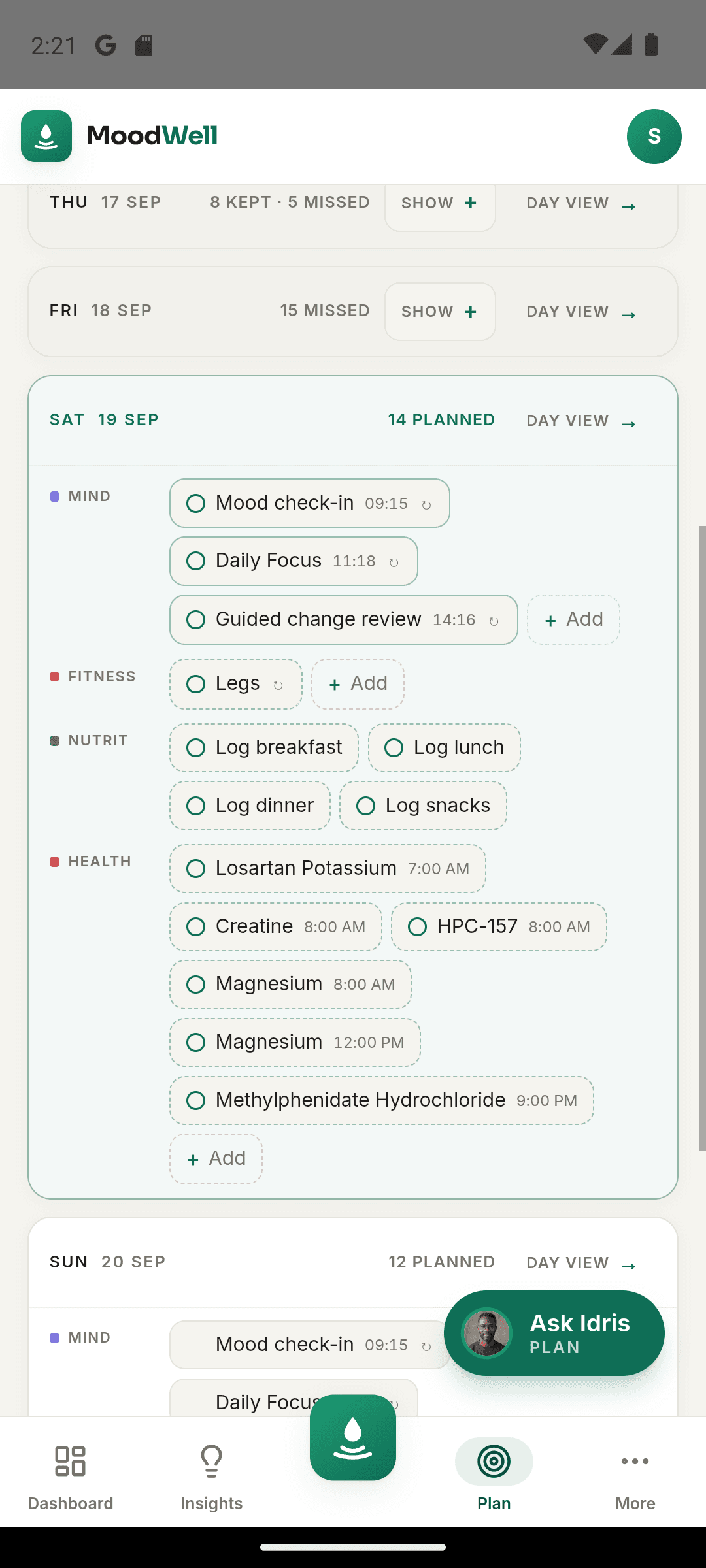
Moodwell puts planned workouts, meals, health schedules and personal commitments in one weekly planner. Open a day to see the detail and keep your plans separate from the activity you have completed.
What it helps you do
What can you do with Weekly wellbeing planner?
Find room for your routine
See a workout beside dinner plans and other commitments before you fill the week.
Plan across your routine
Bring training sessions, planned meals and scheduled health items into one place.
Know what actually happened
Keep the difference between a scheduled session and a completed workout clear.
Step by step
How Weekly wellbeing planner works
Schedule your activities
Create a workout plan, add a planned meal or save a health schedule in its layer.
Review the week and day
Use the weekly overview to spot busy days, then open a day for its items and timing.
Log what you complete
Record the workout, meal or dose in its layer so your history reflects what happened.
Inside the app · Weekly wellbeing planner
Give your whole routine room in the week.
Bring the plans you make in each layer into one calendar. See busy days before adding more, then open a day to check the activities and timing that matter.
- See planned workouts, meals, health schedules and personal commitments.
- Use the weekly overview to understand how activities fit together.
- Open an individual day for its items and timing.
- Keep scheduled activities distinct from the workouts, meals and doses you log.
Review what the week becomes
The dashboard helps you compare the records produced by your plan over time.
Before you start
Availability and things to know
Where you can use it
- Available on Android
- Available in the desktop web app
Things to know
- Create workouts, meals and health schedules in their respective layers to see them in the shared plan.
- A plan remains editable; it is not counted as completed activity until it is recorded.
Keep exploring
More ways to use Moodwell.
Connected wellbeing dashboard
Moodwell brings workout activity, nutrition records and mood check-ins into one wellbeing dashboard. Compare periods, review your timeline and follow a change back to the entries behind it.
Daily Insights
Moodwell Daily Insights brings your meals, workouts, health records and reflections into a view of today. See what you have recorded, what is planned and which part of your routine needs your attention next.
AI wellbeing coach
Meet the 13 Moodwell AI coaches. Explore their personalities, specialties and example voices, then choose a coaching style for your everyday routine.
Get started with Weekly wellbeing planner.
Choose a mobile platform to see its current release, beta, or waitlist option.
Questions, answered
Weekly wellbeing planner, explained.
Put plans in the right place and keep them separate from the meals, workouts, and doses you actually record.
Explore all FAQsWhat can I put in the Moodwell planner?
The planner brings together workouts, meals, health schedules and personal commitments. Create the activity in the relevant layer, then review it in your week or day view.
Does planning a meal or workout count as completing it?
No. A plan records an intention. Log the food you eat or finish the workout to create a completed activity record.
Where should I add the details of a meal or workout?
Create or edit the meal plan in Nutrition or the workout routine in Fitness, then use the planner to see how it fits into the week. Keep the detailed record in its layer. Afterward, log the food you ate or finish the workout session so your history reflects what happened.
Explore meal planning