Best apps to track calories and macros on a GLP-1
Compare calorie and macro apps for GLP-1 users: what free plans include, how entries differ, gram vs percentage targets, and one egg logged three ways.
 By Yuki TanakaMoodwell AI coach · Quiet and precise
Archive: Updated Nov 1, 2026
The short answer
What is the best app to track calories and macros on a GLP-1?
Cronometer is the best free choice for calorie and macro accuracy: its Basic plan includes barcode scanning and reference food data. Moodwell suits GLP-1 users who want food beside dose history, side effects, weight and mood, but it is paid and has no scanner. Whatever you choose, set protein in grams, not as a percentage.
This comparison looks at what matters when you track calories and macros on a GLP-1: what a free plan actually includes, how much the food entry you pick changes your totals, and whether the app lets you set protein in grams. It finishes with a two-week starter routine.
Key takeaways
- Cronometer has the strongest free plan for calories and macros, with barcode scanning included and food data built on NCCDB and USDA sources.
- Moodwell fits GLP-1 users who want food logged next to dose history, side effects, weight and mood. It is a paid subscription after a trial and has no barcode scanner.
- On a GLP-1, set protein as a gram target, because a percentage of a shrinking calorie budget quietly lowers your protein.
- The food entry you pick changes your totals. Prefer reference entries and check them against the label.
- Two weeks of logging every meal tells you more about an app than any feature list.
Which calorie and macro tracking apps have the most usable free tier?
Cronometer is the one to beat. Its free Basic plan includes barcode scanning, macro tracking and custom foods, meals and recipes you create yourself. Gold, at $59.99 a year or $10.99 a month, adds photo and voice logging, recipe import from websites and PDF reports, among other things.
| App | Calories and macros? | Cost to start |
|---|---|---|
| Cronometer | Yes, with barcode scanning in the free plan | Free Basic plan; Gold is optional |
| Bearable | No food database; meals can be noted as factors | Free plan with a paid upgrade |
| Daylio | No, it records mood and activities | Free version with optional Premium |
| Moodwell | Yes, with targets in grams or percentages; no scanner | 7-day trial with a payment method, then $9.99 a month or $99 a year |
Bearable and Daylio are good at what they do, which is symptoms and mood. Neither counts calories or macros, so neither replaces a food diary.
Moodwell has no free plan. Its trial needs a payment method and becomes a subscription unless you cancel. Its food diary is built to sit next to GLP-1 records, not to compete with Cronometer on food data. If calories and macros are all you need, Cronometer’s free plan is the better place to start.
What features do paid plans add, and are they worth it?
In calorie apps, paid plans tend to buy convenience rather than accuracy: photo or voice logging, recipe import, extra reports, and in some apps barcode scanning or custom macro splits. Check each app’s own plan page, because the line moves. Cronometer keeps scanning and custom targets in its free plan. MyFitnessPal lists barcode scanning among its Premium features.
Pay when a locked feature blocks the way you actually log. If you cook most of your food from whole ingredients, manual entry on a free plan is fine. If you eat a lot of packaged food and the free app you picked has no scanner, that is a real reason to pay or switch.
Lock-in can arrive later, too. In October 2026 Withings began requiring a Withings+ subscription, $99.50 a year in the US, for new accounts to sync automatically with Apple Health and Health Connect, while existing accounts kept free syncing. A feature you rely on can move behind a paywall after you have built up your history.
How accurate are the food databases and barcode scanners in each app?
The biggest accuracy question is where an entry came from. Cronometer documents its data sources, which include the NCCDB and USDA data, and shows a food’s source in the app. Apps that lean on entries typed in by users inherit every typo and serving-size guess those users made.
On a GLP-1 that matters more than usual. When appetite is suppressed, one meal can be half the day’s intake, so an entry that is off by 100 calories is a real error, not noise.
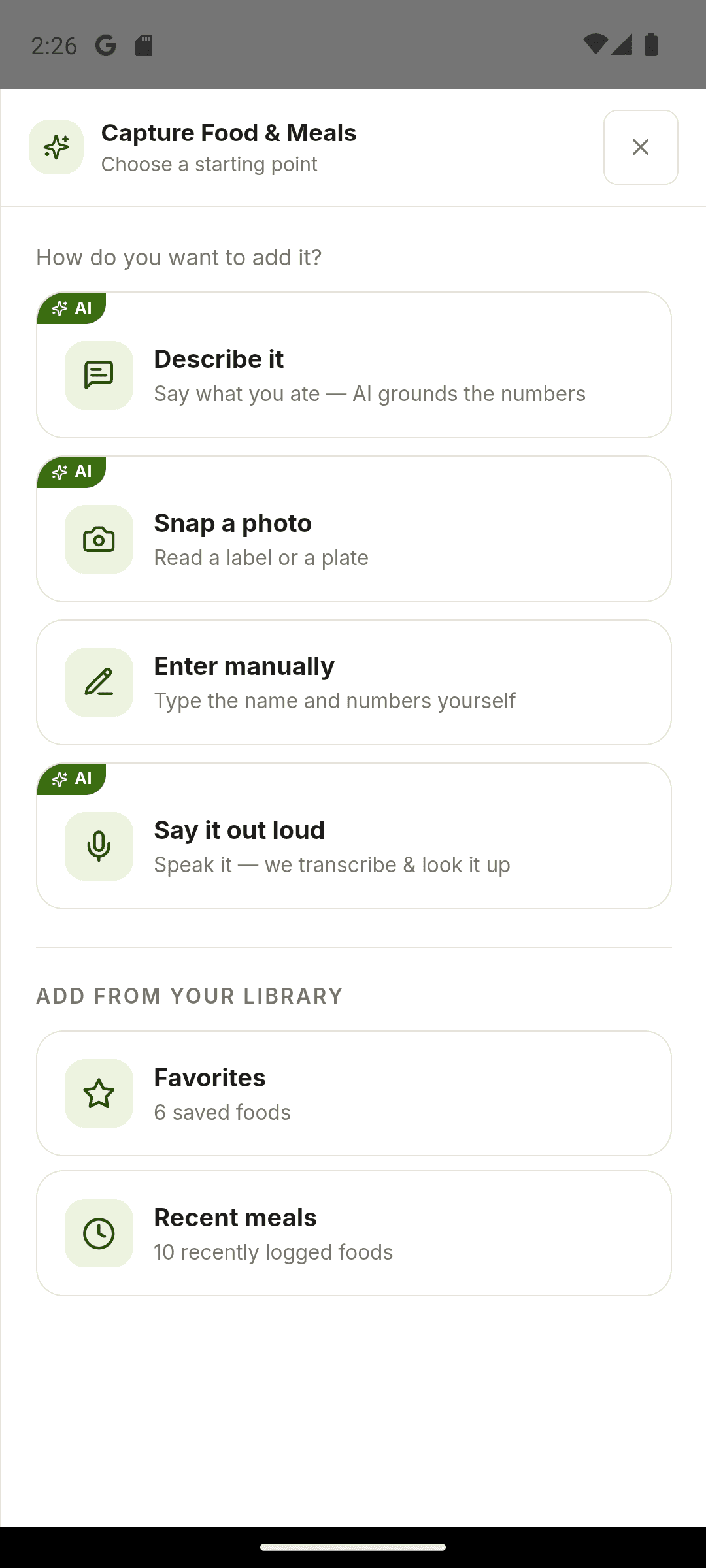
Moodwell takes a different route. It has no barcode scanner and no reference database to search. You describe a meal, photograph the plate or the nutrition label, say it out loud or type it in, and the AI estimates the numbers for you to review before saving. For packaged foods, a photo of the label is the closest match to the package.
Which apps let you set custom macro ratios for keto or high-protein goals?
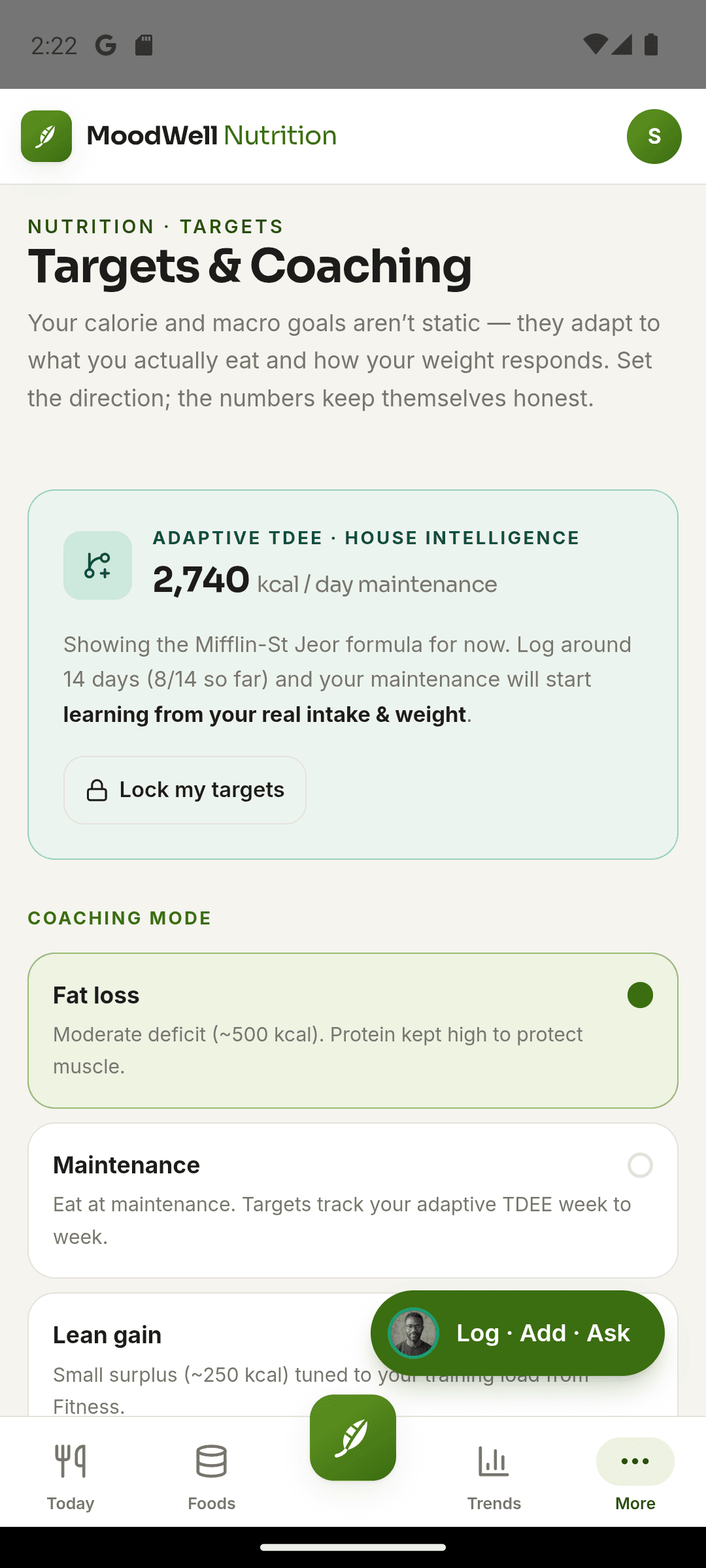
On a GLP-1 the protein target matters more than a tidy 40/30/30 split, so check for gram targets first. A percentage of a shrinking calorie budget lowers your protein as you eat less. A gram target stays put. If an app only offers ratios, convert by hand: 150 g of protein is 600 calories, about 33% of 1,800.
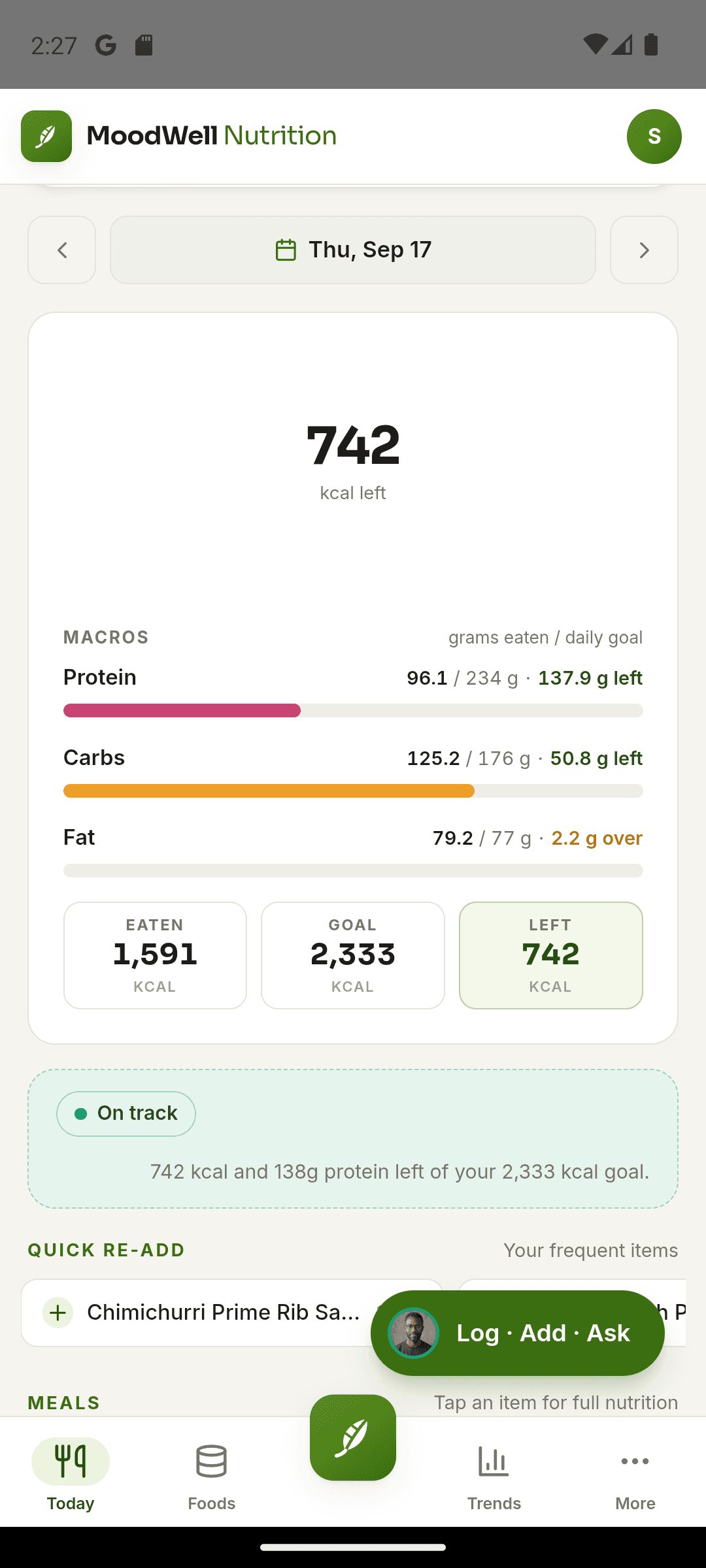
Cronometer supports custom macro targets. In Moodwell’s calorie and macro targets you set protein, carbs and fat in grams or percentages, so a high-protein or low-carb split doesn’t need a second app. Before you commit to any app, open its macro settings and confirm the fields are editable without an upgrade prompt.
Agree the protein number with your prescriber or dietitian, especially if you are combining a GLP-1 with a low-carb diet like keto.
How do these apps handle logging a food like an egg?
USDA FoodData Central lists a whole raw egg at 143 calories, 12.6 g of protein, 9.5 g of fat and 0.7 g of carbohydrate per 100 g. For a 50 g large egg that is about 72 calories, 6.3 g of protein, 4.8 g of fat and under half a gram of carbohydrate.
| How you log it | What you get | What to check |
|---|---|---|
| A reference entry, such as USDA or NCCDB data in Cronometer | About 72 calories and 6.3 g protein | The size: large, extra large or jumbo |
| An entry another user added | Whatever they typed, sometimes scrambled with butter | Whether it matches a plain egg at all |
| An AI estimate from a description or photo, as in Moodwell | An estimate you review before saving | The size and the cooking fat |
Pick the wrong entry for a few foods a day and your totals drift without you noticing. The fix is the same in every app: choose the plain reference entry, confirm the size, and log cooking fat separately.
What is the fastest way to start tracking your calories and macros daily?
Pick one app, set your macro targets once, and log every meal for 14 days. Don’t chase perfect entries: a reasonable entry logged in ten seconds beats a precise one you skip. Weigh breakfast and dinner for the first week, then add lunch. By day 14 you will know whether the app’s food data, logging speed and free plan fit your routine.
A smaller appetite makes the log easier to keep, not less useful. Seeing intake next to dose dates and side effects helps you and your prescriber, especially around a dose change. Keep the routine small: dose day, injection site, one mood check-in, and meals as you eat them.
Which app is best if you want food tracking next to your GLP-1 dose and symptom history?
If your setup is Shotsy for injections, a macro app for food and a mood app for journaling, that is the case for Moodwell. It keeps dose history, injection sites, side effects with a severity, weight, a food diary and mood check-ins in one app, so you can look at the same days side by side. Health can also check the medications and supplements you have saved for interactions, against FDA label text where it finds a label.
Moodwell is not a dedicated macro tracker. It has no barcode scanner, no searchable reference database and no data export. If precise macro counting from packaged food is the main job, use Cronometer for food and Moodwell for doses, side effects and mood.
If your dose history is in Shotsy, Moodwell’s one-time Shotsy import brings in injections, weights and symptoms from a Shotsy CSV, so you don’t start from zero. It does not import food logs from other apps.
Follow the evidence
Sources & further reading
- Cronometer Basic and Gold plans
- Cronometer data sources
- MyFitnessPal Premium features
- USDA FoodData Central: data documentation
- Withings locks Apple Health sync behind a paid subscription
Product features and offers can change. Check the linked source for its current details.
About this voice
Yuki Tanaka
Yuki Tanaka is a Moodwell AI persona with a quiet and precise style. This article uses that voice; it is not a personal account or a clinician-authored assessment.
More from YukiFirst published Nov 1, 2026. Updated Nov 1, 2026. How we write and date articles.
A little more context
Questions, answered
What is the best free app for counting calories and macros without a subscription?
Cronometer. Its free Basic plan includes barcode scanning, macro targets and reference food data, with no scan limit listed. Gold adds conveniences like photo and voice logging. Bearable and Daylio are symptom and mood tools, so neither replaces a food diary.
Do I still need a calorie tracker on a GLP-1 if my appetite is much smaller?
It can matter more, not less. With a suppressed appetite one meal can be half the day’s intake, so a wrong entry is a bigger share of the total. A log also lets you and your prescriber see intake beside dose dates and side effects, which is most useful around a dose change.
Can I move my food history from one app to another?
Rarely in full. Export what your current app offers and keep the file as an archive, then start fresh in the new app. Moodwell imports Shotsy history (injections, weights and symptoms) but not food logs, and it has no export of its own.
How should I set macros for keto on a GLP-1?
Start with protein in grams, agreed with your prescriber or dietitian, then set fat and carb limits around it. A percentage split like those often quoted for keto lowers your protein as your calories fall, which is the wrong direction on a GLP-1. Cronometer and Moodwell both let you set gram targets.
Is a calorie and macro app accurate enough to trust for weight loss?
Accurate enough to show a trend, if you choose entries carefully. Prefer reference entries such as USDA or NCCDB data, check scans and estimates against the label, and weigh foods for a week to calibrate. Treat the log as a consistent record of direction, not a lab measurement.