
Best food logger for GLP-1 users: a buyer’s guide
How to choose a food logger on a GLP-1: trustworthy entries for protein, fast logging when appetite is low, and what happens to your history if you switch.
 By Mara KesslerMoodwell AI coach · Direct and decisive
Archive: Updated Oct 30, 2026
The short answer
What is the best food logger for GLP-1 users?
The best food logger on a GLP-1 is the one that gets protein right, logs a small meal in seconds and keeps your history usable if you switch. Cronometer leads on checked food data. An all-in-one app like Moodwell trades database depth for keeping doses, side effects, weight, mood and food together.
This guide scores food loggers on four things that matter more on a GLP-1 than on an ordinary diet: whether you can trust the protein numbers, how fast an entry is when you barely want to eat, whether you can set targets in grams, and what happens to your records if you leave. It is honest about where Moodwell is the weaker choice.
Key takeaways
- Check where a food’s numbers came from. A checked reference entry beats a copy someone typed in from memory.
- On a GLP-1, a protein target in grams matters more than a calorie ceiling, because low appetite makes protein the hard number to hit.
- Logging speed decides whether you keep going: reuse saved and recent foods, and photograph labels you eat often.
- Before you commit, find out whether your history can leave the app, and whether your old tracker’s history can come in.
- Moodwell trades a searchable food database for keeping doses, side effects, weight, mood and food in one app.
What makes a food logger accurate for macros, not just calories?
Macro accuracy depends on where an entry came from, not on how big the database is. A database with millions of entries can still hand you a protein figure nobody checked against a label. When protein is the number you are managing, the source of each entry matters more than the count.
Cronometer is the clearest example of an app built around this. It documents its data sources, including the NCCDB and USDA reference data, and its search has a filter that limits results to NCCDB entries. Prefer the reference entry over a duplicate of the same food, and check the serving size either way. Picking a carelessly entered food three times a day is how a protein total quietly drifts.
Protein is the right number to manage because appetite suppression makes calories easy to undershoot and protein hard to reach. A 2025 joint advisory from four obesity and nutrition societies lists adequate protein and strength training to preserve lean mass among its priorities for people on GLP-1 therapy. Set a protein target in grams with your prescriber or dietitian, and treat the calorie number as secondary.
Which food logger is fastest for daily logging?
On a GLP-1, meals are small and appetite is low, so a diary that takes two minutes per snack gets abandoned. The practical test is how many taps it takes to get from holding the food to having it logged.
- Barcode scanning is the quickest route for packaged foods in apps that have it, and it narrows the product match. You still confirm the portion.
- Photo and description logging are fast for mixed plates, but the app is estimating, so review the food and portion before you save.
- Manual entry from a label is the slowest. Save the food afterwards so you only type it once.
- Reuse is the real speed lever. Copying a recent food or adding a favorite makes day 30 as quick as day 1.
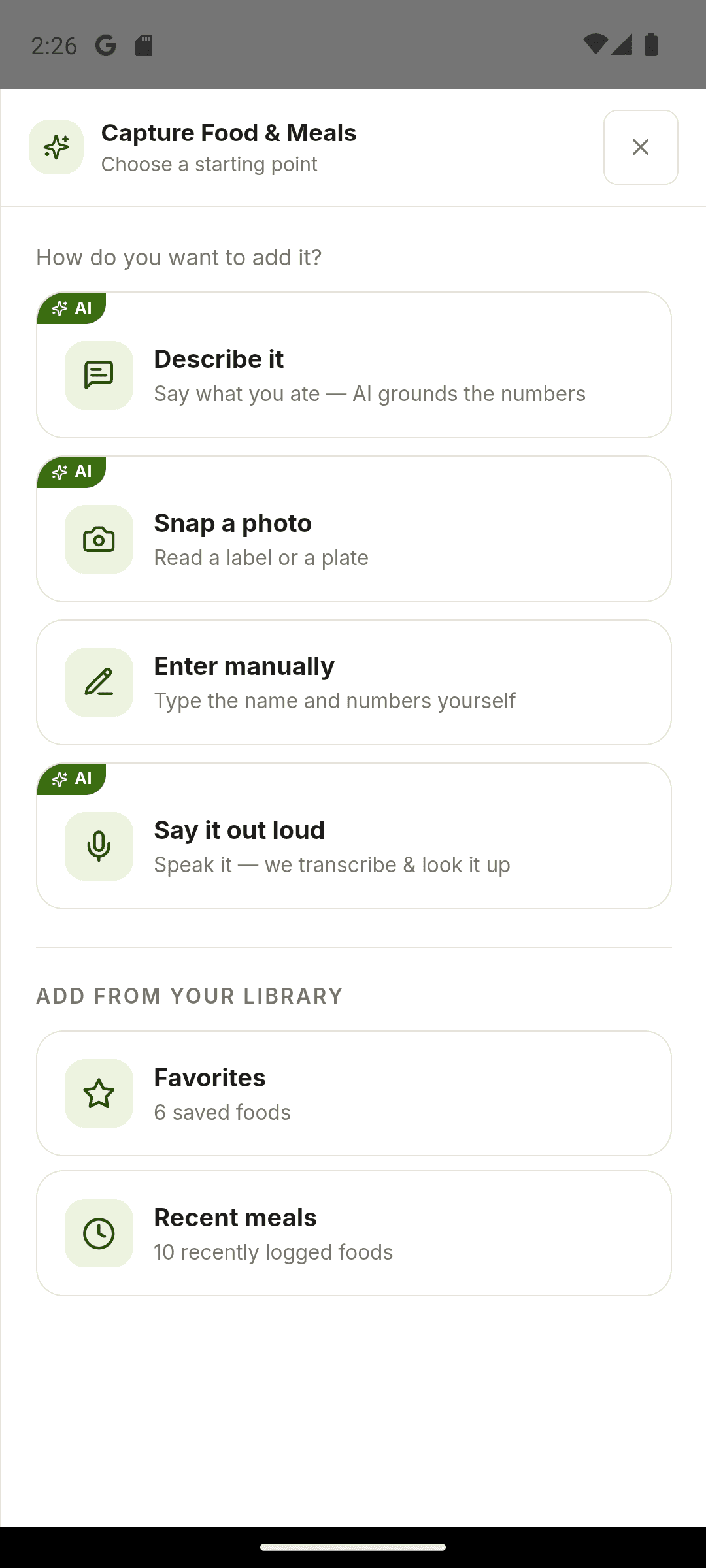
Moodwell has no barcode scanner. Its capture sheet offers Describe it, Snap a photo (of a plate or a nutrition label), Say it out loud and Enter manually, plus your favorites and recent meals. The AI options need a plan or trial and use credits. Manual entry and your library don’t.
How do the top food loggers compare?
| App | Food data | Fastest route | GLP-1 records |
|---|---|---|---|
| Cronometer | Reference data from NCCDB and USDA, with a source filter | Barcode scanning | None for doses or injection sites |
| MyFitnessPal | Large database with many member-added entries | Barcode scanning | None for doses or injection sites |
| Bearable | No food database; meals can be noted as factors | One-tap factors | Symptoms and medications |
| Daylio | Not a food logger | One-tap mood entry | Mood only |
| Moodwell | AI estimates you review, plus foods you have saved | Favorites and recent meals | Doses, injection sites, side effects, weight and mood |
Cronometer wins when the food data is the job. Its weakness is the same as any dedicated nutrition app: it has nowhere for dose history or side effects. Our Cronometer vs MyFitnessPal comparison goes through entries, portions and pricing in detail.
Bearable and Daylio are symptom and mood trackers first. Neither counts protein, so neither replaces a food logger. They can sit beside one.
Moodwell’s food logging is built to sit next to GLP-1 records rather than to compete on database depth. There is no reference database to search: foods come from AI estimates you review, label photos and manual entries, and then live in your own library. If you want the deepest checked food data, Cronometer still wins, and our MyFitnessPal alternatives breakdown covers that trade-off.
Which app is best if you only care about protein, not calories?
If your prescriber or dietitian gave you a protein target but no calorie target, look for an app that lets you set macros in grams and shows protein remaining where you log. Most apps still show calories as the headline number, so check whether that bothers you before you commit.
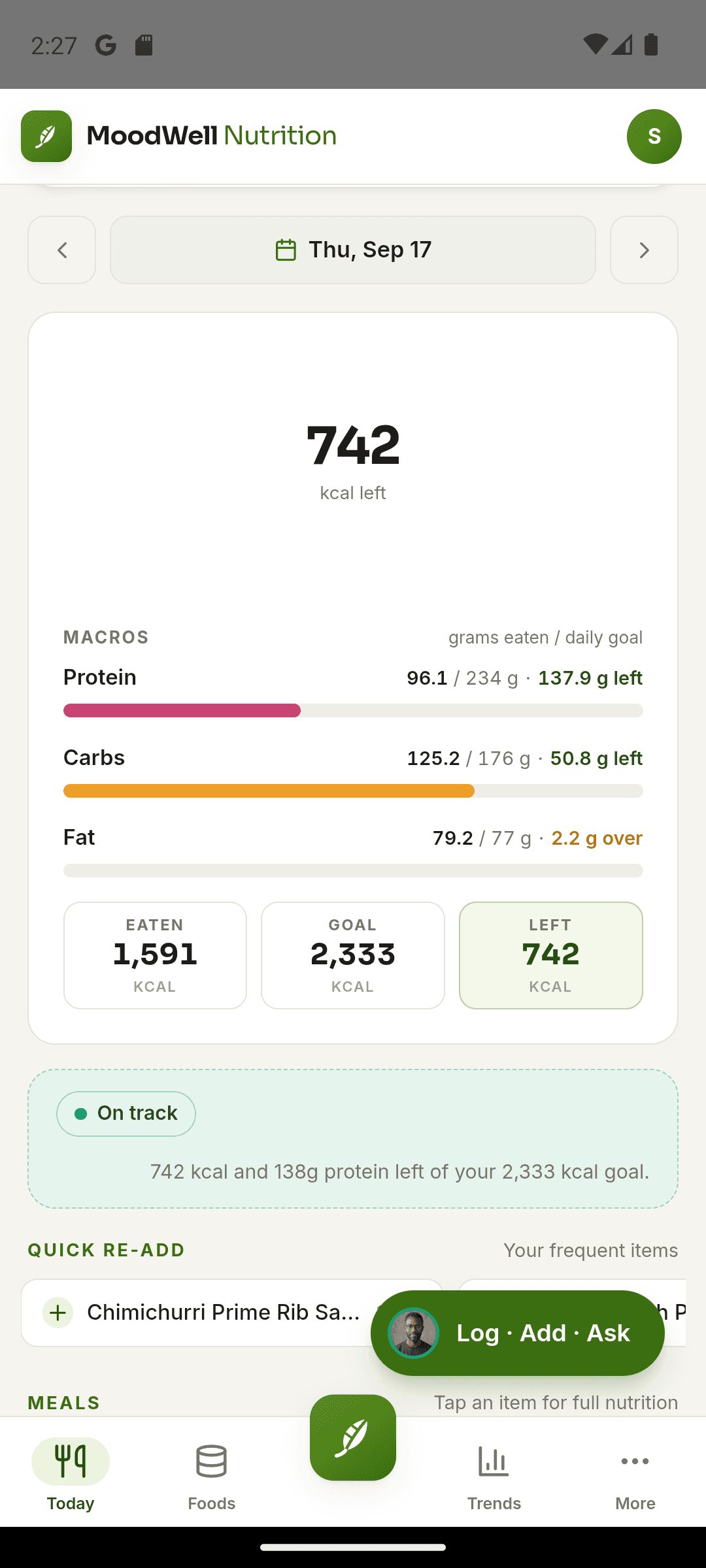
Cronometer supports custom macro targets. In Moodwell’s calorie and macro targets you edit protein, carbs and fat in grams or as percentages, and the Fat loss coaching mode keeps protein high to protect muscle. Calories are worked out from the macros and stay visible.
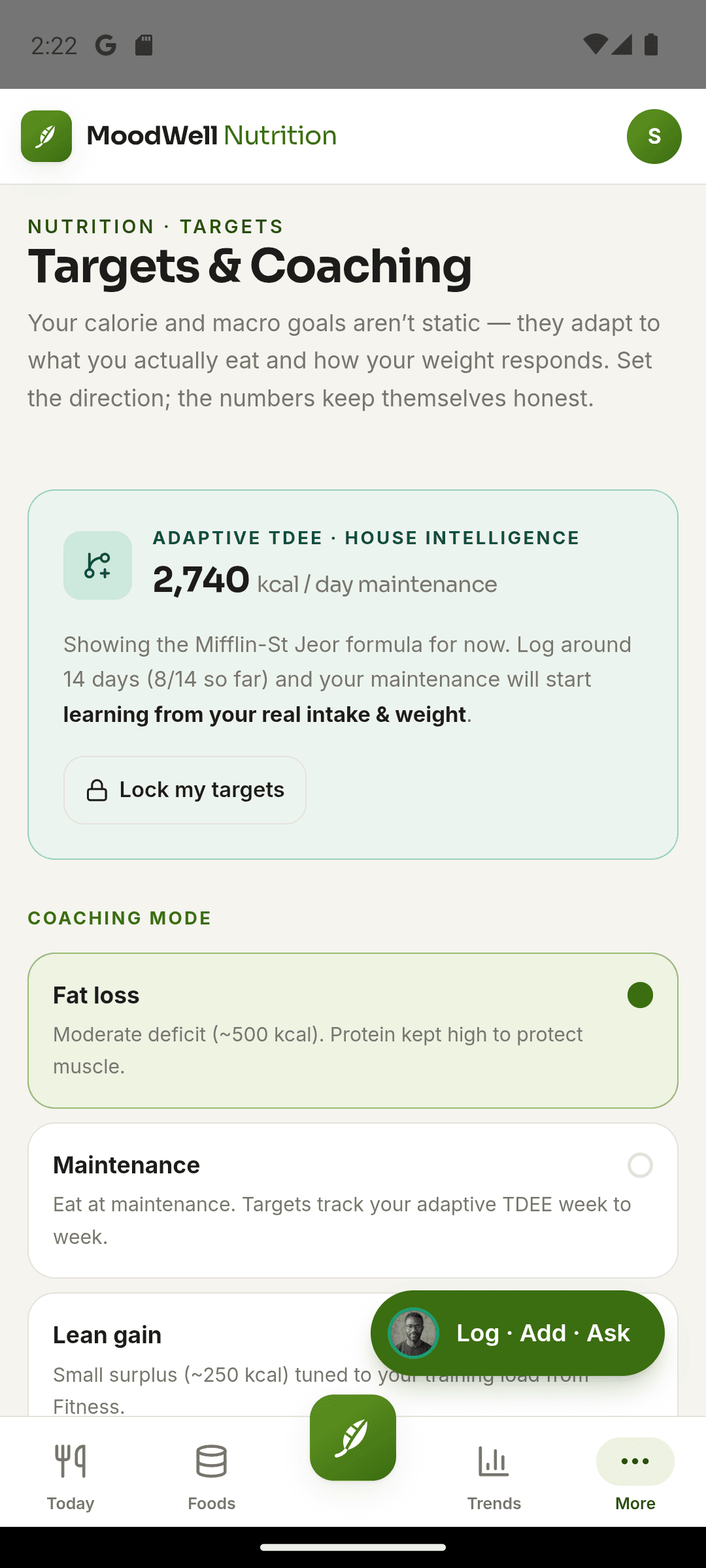
What helps most on the day is seeing protein remaining at a glance, so at 6 p.m. you know whether dinner needs 30 more grams.
Can you export or back up your food log if you switch apps?
Export is only half the question. The other half is whether the app you move to can read your history back in, and whether the app you keep stays affordable.
Lock-in can arrive after you have committed. In October 2026 Withings began requiring a Withings+ subscription, $99.50 a year in the US, for new accounts to sync automatically with Apple Health and Health Connect. Accounts created before the change kept free syncing, and manual CSV exports stayed free, but people buying a scale now face a fee to move their own readings. A food log is no different: dose history, side effects and weekly weigh-ins are only worth keeping if you can keep them.
- Can you export every field you log, not just calories?
- Can you trigger the export yourself, without emailing support?
- Does the app you are moving to import anything, and from which apps?
When is a free food logger enough, and when is paid worth it?
Free tiers usually cover the core loop: find a food, log it, see the day’s calories and macros. Cronometer’s free Basic plan does this with its reference data, and Gold adds other tools. If all you need is a food diary, free is enough.
The cost question changes when food is one of several records. Many GLP-1 users end up with a food app, an injection tracker and a journal. Moodwell is $9.99 a month after its trial and keeps doses, side effects, food, weight and mood together, and Health can check your saved medications and supplements for interactions against FDA label text where it finds a label. If it replaces two paid apps, it is cheaper and gives you fewer places to look. If you only log food, pay nothing.
What should you check before committing to a food logger long-term?
- Can your history leave the app, as a full file you export yourself?
- Does it show where an entry’s numbers came from, so a careless entry doesn’t throw off your protein?
- Can you set protein in grams, not just a calorie goal?
- Can you log a small meal in under 30 seconds, or will you stop by week three?
- Does it sit next to your dose history, injection sites, side effects and mood, or does it send you back to three apps?
How does a food logger fit an all-in-one GLP-1 tracking stack?
If your food questions are mostly “how much did I eat around my injection, and how did I feel after”, one app is simpler. Moodwell keeps dose history, injection sites, side effects with a severity, weight, mood check-ins and a food diary in one place, so you can look at the same days side by side when nausea shows up. The comparison is yours to make: Moodwell doesn’t claim to work out whether a side effect came from the dose or the meal.
If you are working to a specific protein target to protect muscle, a reasonable split is Cronometer for food and Moodwell for doses, side effects and mood. That is two apps, and each one does its job properly.
Follow the evidence
Sources & further reading
- Nutritional priorities to support GLP-1 therapy for obesity (joint advisory)
- Cronometer data sources
- Cronometer: tips for getting started
- Withings locks Apple Health sync behind a paid subscription
Product features and offers can change. Check the linked source for its current details.
About this voice
Mara Kessler
Mara Kessler is a Moodwell AI persona with a direct and decisive style. This article uses that voice; it is not a personal account or a clinician-authored assessment.
More from MaraFirst published Oct 30, 2026. Updated Oct 30, 2026. How we write and date articles.
A little more context
Questions, answered
Which food logger has the most trustworthy food data?
Cronometer is built around reference data from sources like the NCCDB and USDA, and its search can be limited to NCCDB entries. Whatever app you use, prefer a checked reference entry over a member-added copy of the same food and confirm the serving size, since a careless entry eaten three times a day throws off your protein total.
Can I set protein targets without tracking calories?
Mostly, though calories rarely disappear. Cronometer supports custom macro targets. Moodwell lets you set protein, carbs and fat in grams or percentages, and works out calories from them, so the calorie figure stays visible. On a GLP-1, the protein target is the number that actually needs watching.
Does Moodwell have barcode scanning?
No. In Moodwell you photograph the nutrition label, describe the product with its brand, or type the numbers in by hand. Once a food is saved, it stays in your favorites and recent meals, so you only enter a packaged food once.
Is a free food logger enough, or should I pay?
If you only log food, a free tier usually covers it: find, log and see the day’s macros. Paying makes sense when you are stacking a food app, an injection tracker and a journal, because one subscription that holds doses, side effects and food can cost less than several.